





Navigation
This article describes the steps involved in connecting to the ViaTracks API. The ViaTracks API uses OAuth2 authorization with Devinco Connect as provider. The API consumer needs an access token to get any data back from the API, and Devinco Connect provides this.
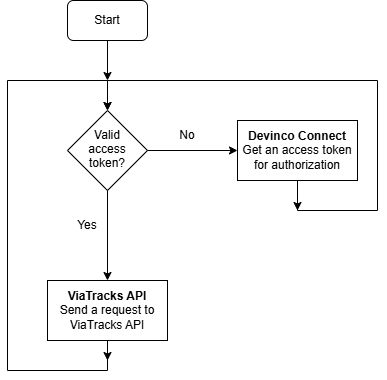
Authentication server URL
Devinco Connect URL for production:
https://connect.devinco.com
Get Access token from the Devinco Connect service
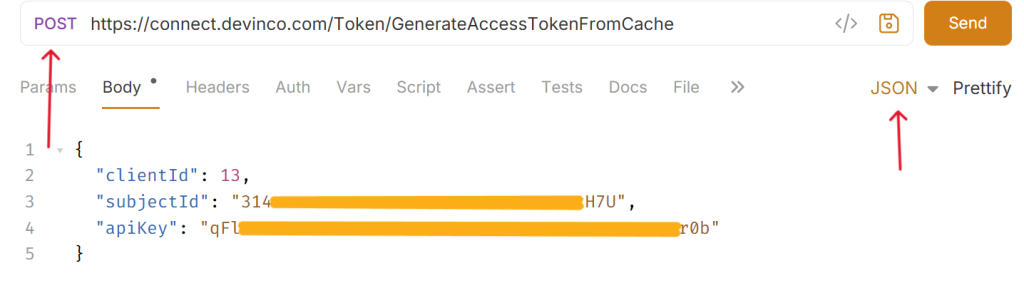
In order to use the ViaTracks API, you would need an access token from the Devinco Connect service: Send a POST request to
For the production environment:
https://connect.devinco.com/Token/GenerateAccessTokenFromCache
with the following body/payload:
{
  "clientId": 13,
  "subjectId": "<your-subjectId>",
  "apiKey": "<your apiKey>"
}
subjectId and apiKey are provided by Devinco for the user that will run the integration.
Please note that for the ViaTracks API, always use clientId=13 which for the Devinco Connect service means ViaTracks.
Example:
curl --location --request POST 'https://connect.devinco.com/Token/GenerateAccessTokenFromCache\
--header 'Content-Type: application/json' \
--data-raw '{
"clientId": 13,
"subjectId": "<your subjectId>",
"apiKey": "<your api key>"
}'Type: HTTP
Request: POST
URL: https://connect.devinco.com/Token/GenerateAccessTokenFromCache
Body –> Select JSON in the dropdown. Paste the payload mentioned above and edit it to include your subjectId and apiKey.
Type: HTTP
Request: POST
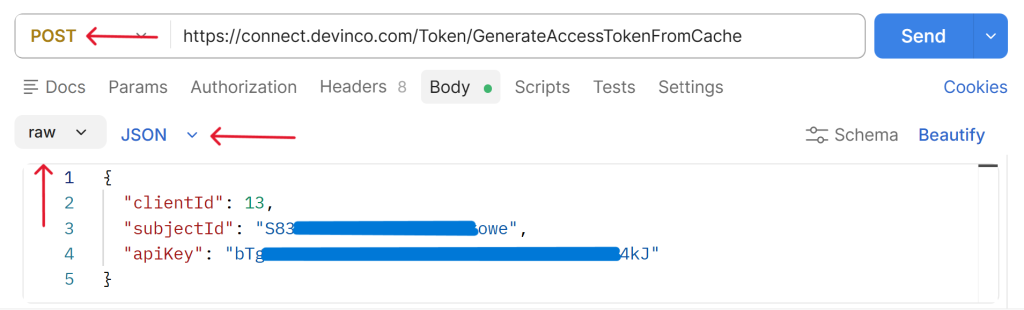
URL: https://connect.devinco.com/Token/GenerateAccessTokenFromCache
In Body tab:
– select raw in the first selector
– select JSON in the right selector
Paste the payload mentioned above and edit it to include your subjectId and apiKey.
When the access token is returned from Devinco Connect, you are ready to use the ViaTracks API itself.
Send a request to the ViaTracks API
Paste the access token provided from the response in the previous section into the Bearer section of the Authorization header.
Example – Get list of TrackerObjects
curl --location --request GET 'https://api.viatracks.com/api/TrackerObject?Page=1&Pagesize=50'  \
--header 'Authorization: Bearer <your-access-token>'Type: HTTP
Request: GET
URL: https://api.viatracks.com/api/TrackerObject?Page=1&Pagesize=50
Auth: –> Bearer Token –> Paste Bearer Token
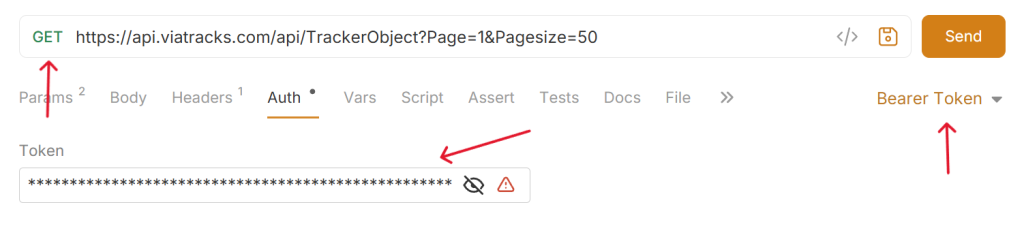
Type: HTTP
Request: GET
URL: https://api.viatracks.com/api/TrackerObject?Page=1&Pagesize=50
Authorization –> Choose Bearer Token under Auth Type –> Paste token

As long as integration is enabled, you should get the same list of TrackerObjects (vehicles) as you have access to with this user in ViaTracks Web.